Working with multiple Users environments
When working with Bizzkit products, you often have multiple different environments to handle. The standard setup contains a staging environment and a production environment. As these environments serve different purposes, it's important for users to know at all times which environment they're currently using.
That's why Bizzkit supports a way to visually tag each environment with a name and colored label, which makes it easy for users to identify each individual environment. The indicator is global and appears across all Bizzkit products — it is configured centrally in Bizzkit Users.


Configuration
There are two settings which can be used to set an environment indicator:
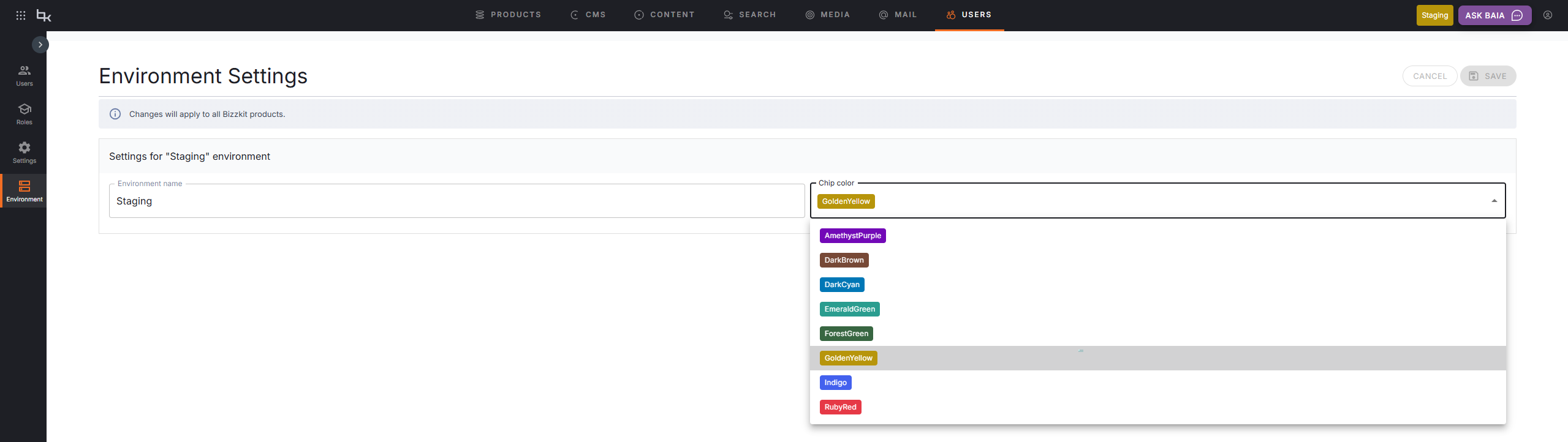
Environment Name: any text (up to 100 characters) which is used as a labelEnvironment Color: a color to use as background color for the text label — choose from a set of predefined colors: AmethystPurple, DarkBrown, DarkCyan, EmeraldGreen, ForestGreen, GoldenYellow, Indigo, or RubyRed
These can both be set by a user with the manage permission, on the Environment page found in the left sidebar of the Users admin UI.
Info
The environment indicator will only be shown if an Environment Name is set, so just clear the value for that field to remove the environment indicator.
Warning
Changes to the environment indicator apply immediately to all active sessions across the platform — not just the current user's session.