SMTP best practices
Bizzkit Mail dispatches every mail through the SMTP server you register as a mail provider. How you configure that server determines both the security of the connection and the deliverability of your mails. This page describes the configuration we expect customer solutions to use, and why.
You manage SMTP servers in the admin site under Settings → SMTP Servers. They can also be managed through the API — see the getting started guide and the Mail API reference.
Recommended configuration
Register your SMTP server with secure submission on port 587, STARTTLS encryption, and SMTP authentication.
Bizzkit recommends
- Port:
587. - Disable SSL: leave it off. Bizzkit Mail then upgrades the connection to an encrypted one with STARTTLS before transmitting anything sensitive.
- Username and Password: the SMTP credentials issued by your mail provider, so every submission is authenticated.
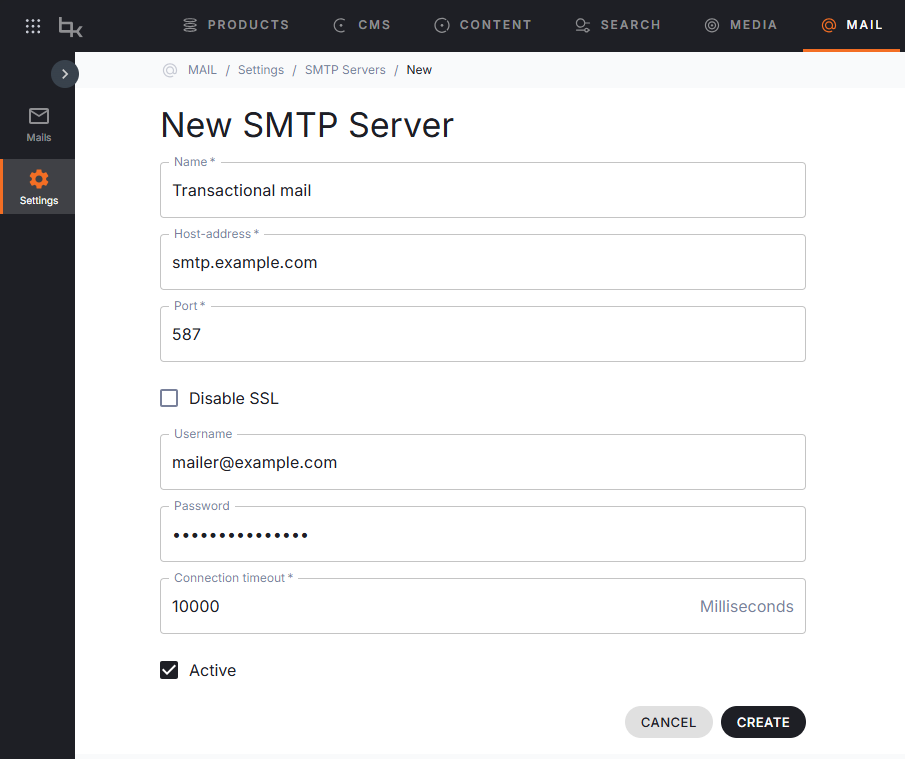
Why port 587 with STARTTLS
Port 587 is the standard message submission port, reserved for clients handing new mails over to a mail provider. Providers expect submissions on this port and typically require authentication on it, which is exactly the combination Bizzkit Mail uses: when Disable SSL is off, Bizzkit Mail connects, upgrades the connection with STARTTLS, and then authenticates with your username and password.
This matters for two reasons:
- Confidentiality: STARTTLS encrypts the connection before your credentials and mail content are transmitted, so they never cross the network in plain text.
- Deliverability: authenticated submission proves to your provider that the mail comes from your solution, which protects your sender reputation and prevents others from abusing your account.
Note that a server which does not offer STARTTLS on the configured port will fail dispatch — encryption is required, not opportunistic.
Ports to avoid
- Port 25 is the relay port used for server-to-server mail transfer. It is typically unauthenticated, widely blocked for outbound traffic by cloud and network providers, and closely associated with spam filtering. Do not use it for submitting mails.
- Port 465 expects the connection to be encrypted from the very first byte (implicit TLS). Bizzkit Mail only negotiates encryption with STARTTLS, so this port is not supported.
Disabling SSL
Warning
Turning on Disable SSL does more than skip encryption: Bizzkit Mail then connects in plain text and skips SMTP authentication entirely, even if a username and password are configured. Only use it for isolated test setups or internal relays that are unreachable from the outside — never in production.
Connection timeout
The Connection timeout controls how long Bizzkit Mail waits for a reply from your SMTP server, and defaults to 3000 milliseconds when omitted. If your provider is occasionally slow to respond, raise it — for example to 10000 milliseconds — since a timeout that is too low results in failed dispatch attempts. The maximum is 60000 milliseconds.