Text generation
Bizzkit PIM offers the functionality to generate texts for PIM attributes based on AI technology. Bizzkit AI Assistant (BAIA) is seamlessly integrated in the PIM UI to provide a smooth user experience when using the text generation functionality.
Feature overview
With this feature BAIA can be used to generate a text value for an attribute based on other attributes, such as global lists or images. Using the custom instructions, the feature can be configured to interpret product characteristics from other attributes such as a product image, which then can be captured in a textual description.
Highlights
- Text generation for supported types of PIM attribute fields
- Image based product descriptions
- Easy configuration of best practice products
- Custom instructions to specify text length, tone of voice, target audience, and more
- Generate texts for multiple products at the same time, using Mass Edit
Bizzkit recommends
There are several use cases where AI text generation in PIM is a useful tool to easily generate product texts, for example:
- Creating product descriptions based on basic product data
- Creating SEO texts for a specific market or channel
- Rewriting product descriptions in a different tone of voice
Providing good example data is essential for a high-quality result, so it is recommended to spend some time setting up the configuration for the best possible outcome of the AI text generation.
Generating texts
Texts can be generated using BAIA for attribute fields that are configured to support this functionality. On the product details page, two action buttons appear below the text field, as shown in the following image:
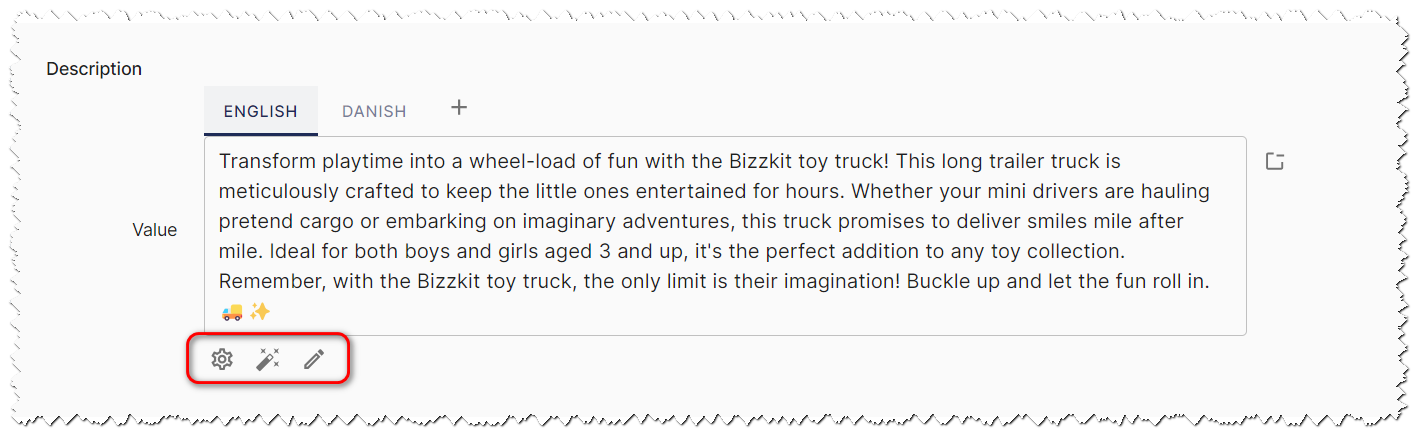
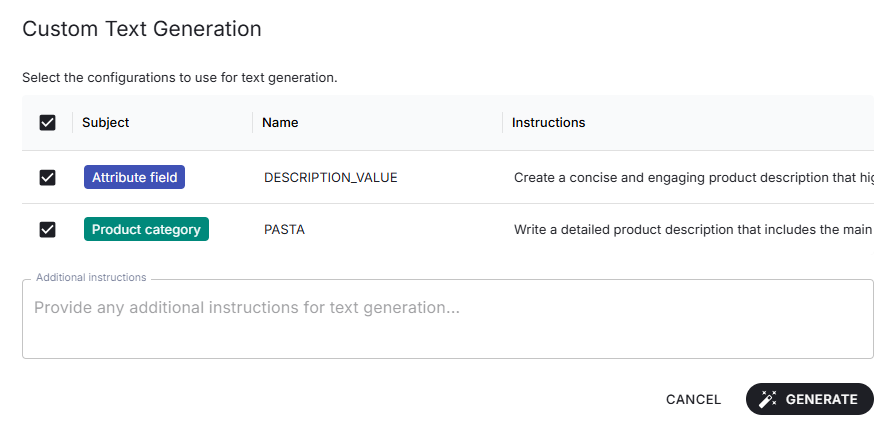
The generate button generates a value based on any matching configurations. The custom generate button opens a dialog that shows a list of the matching configurations that can be toggled to apply or not when generating values from this dialog. There is also a text field for additional instructions that will be combined with any instructions from the selected configurations.
Multi-valued attributes
When generating values for a multi-valued attribute, the UI is slightly different. The generate and custom generate buttons appear both right below each field and again at the bottom. Using the generate or custom generate button right below a field generates a value for just that field. Using the buttons at the bottom generates for multiple fields. When generating values for multiple fields at the same time, a field might be removed in the case a value isn't generated for it.

Working with segmented attribute fields
The AI text generation function uses the preferred segmentation by default to provide input to the text generation engine about which segment on the attribute field to generate a text for.
However, when generating values for a segmented attribute field, the corresponding segmented attribute field values from the relevant attributes will be used as input. The translation culture of the active segment on the attribute field also determines the output language.
You can also add instructions that apply only to a specific culture by creating a translation-culture configuration. When generating a value for a segmented attribute field, the configuration matching the culture of the active segment is applied, and its instructions are combined with any other matching configurations.
Instructions that apply only to a specific channel work the same way, through a channel configuration. An attribute field is segmented by at most one dimension, so a given attribute field is covered by either translation-culture configurations or channel configurations, never both.
Example
Assume a preferred segmentation is selected that has English as translation culture. If the text generation button is clicked when a different segment is active on the attribute field, for example, Danish, the generated value will be in danish.
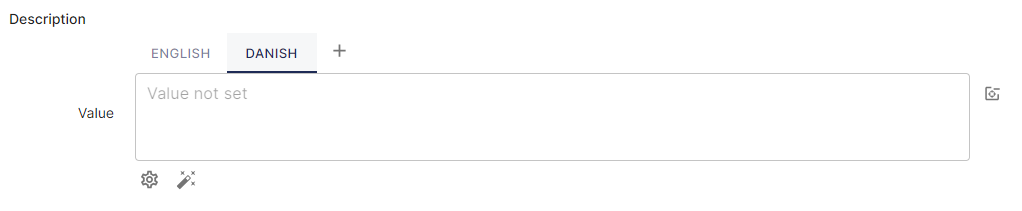
Danish is active on attribute field
Output format
The format of the generated text follows the display setting of the attribute field the value is generated for. PIM tells BAIA which format the field expects, so the generated value arrives ready to publish and does not have to be reformatted by hand.
| Display setting | Generated output |
|---|---|
| Basic | A single run of plain text, with no markup and no line breaks. |
| Multiline | Plain text that may use line breaks to separate lines and paragraphs, but contains no markup. |
| Rich text | An HTML fragment using real markup, such as <p> for paragraphs, <ul> and <li> for bullet lists, and <strong> for emphasis. |
Because the format is derived from the attribute field itself, the instruction prompt does not need to describe it. Instructions remain the place to specify length, tone of voice, target audience and structure.
Tip
An instruction that states its own formatting takes precedence over the field's display setting. Use this when a particular field needs an output that differs from what its display setting implies — but keep in mind that a value which does not match the display setting may need to be reformatted before it can be published.
Note
This does not apply to global list-referencing attribute fields. Those generate a choice from a fixed set of options, so there is no text to format.
Configuring AI text generation
Before AI text generation is available on an attribute field, it has to be configured first.
Info
Read more about configuring this AI feature on BAIA configuration.
Supported data types
The following text-based data types are supported for AI text generation:
- PString
- PTranslatedString
- PTranslatedStringD
- PChannelSpecificString (only for single-valued attributes)
- PChannelSpecificStringD (only for single-valued attributes)
Fields on single-valued or multi-valued attributes that use one of these data types can be configured to use AI text generation.
Tip
Read more about the different data types PIM has to offer and how to set up an attribute in PIM.