BAIA Configuration
Info
The BAIA configuration described here, enhances the AI value generation feature.
For enabling AI Product Placement Suggestions please refer to the developer tutorial.
BAIA value generation is configured in the following ways:
- Relevant attributes: Configure which attributes are relevant for BAIA value generation.
- BAIA configuration: Configure AI value generation for attribute fields, product categories, translation cultures, or channels.
When a product has a primary category that has been configured for BAIA value generation, the best practice products for the category configuration are used instead of from a possible attribute field configuration, but the instructions are combined. If a product has multiple primary categories with configurations, all category configurations are used simultaneously.
A translation-culture or channel configuration adds instructions for a single segment value, such as one language or one sales channel. Its instructions are combined with any attribute field and product category instructions that apply, but it never contributes best practice products.
Relevant attributes
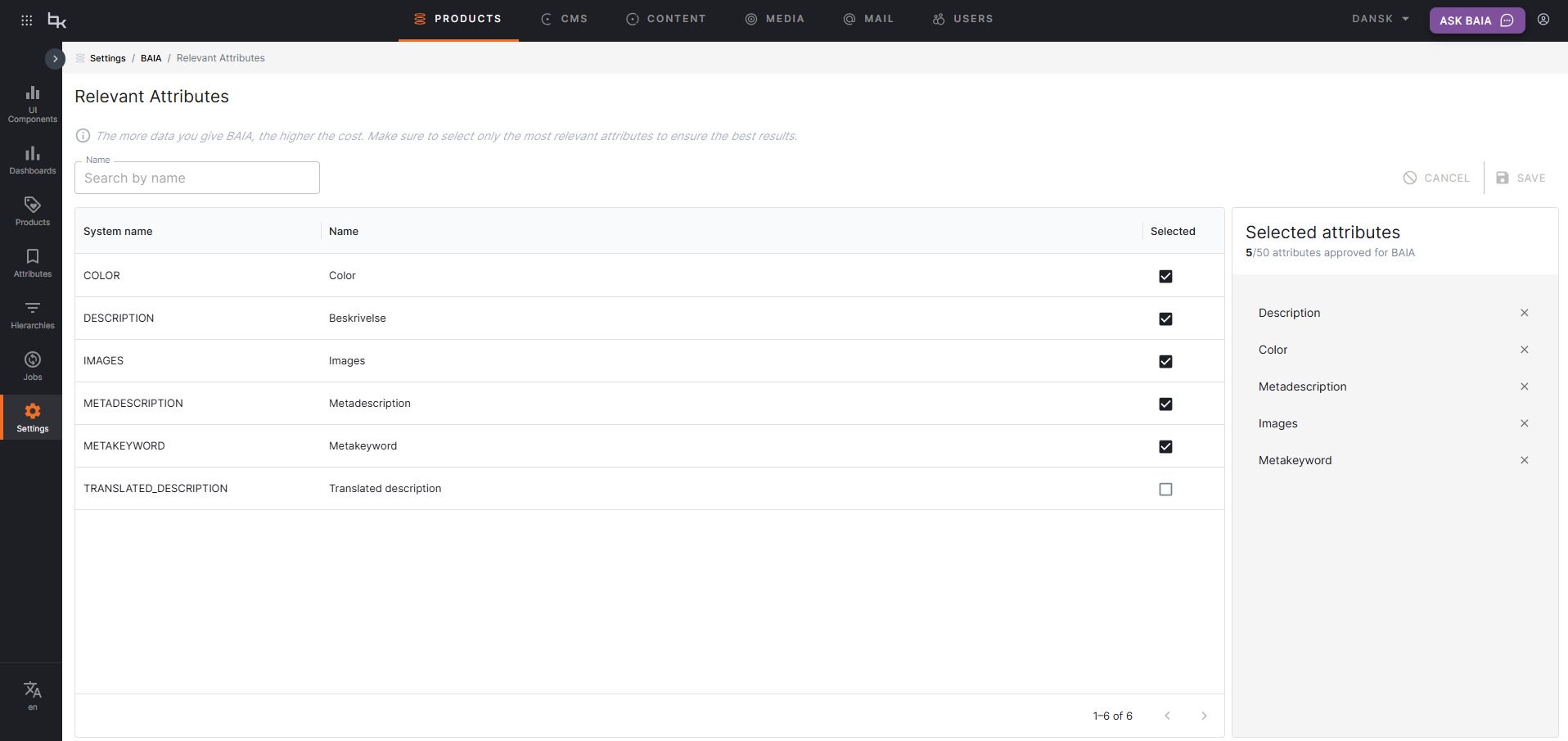
Relevant attributes are configured globally as a whitelist that applies to all BAIA value generation configurations. These attributes serve as input for the AI when generating text or suggestions. The relevant attributes you select should be present on your products to get the best possible results.
Note
Any attribute that does not use predefined values can be selected as a relevant attribute.
Relevant attributes for BAIA value generation can be configured on the Relevant Attributes page, which can be found under the BAIA section on the Settings page.
BAIA configurations
BAIA configurations allow you to set up AI value generation for specific attribute fields, product categories, translation cultures, or channels.
New BAIA configurations and all existing configurations are managed from the BAIA Configuration page, which can be found under the BAIA section on the Settings page. To create a new configuration, click Add Configuration and select one of the four configuration types: Attribute field, Product category, Translation culture, or Channel.
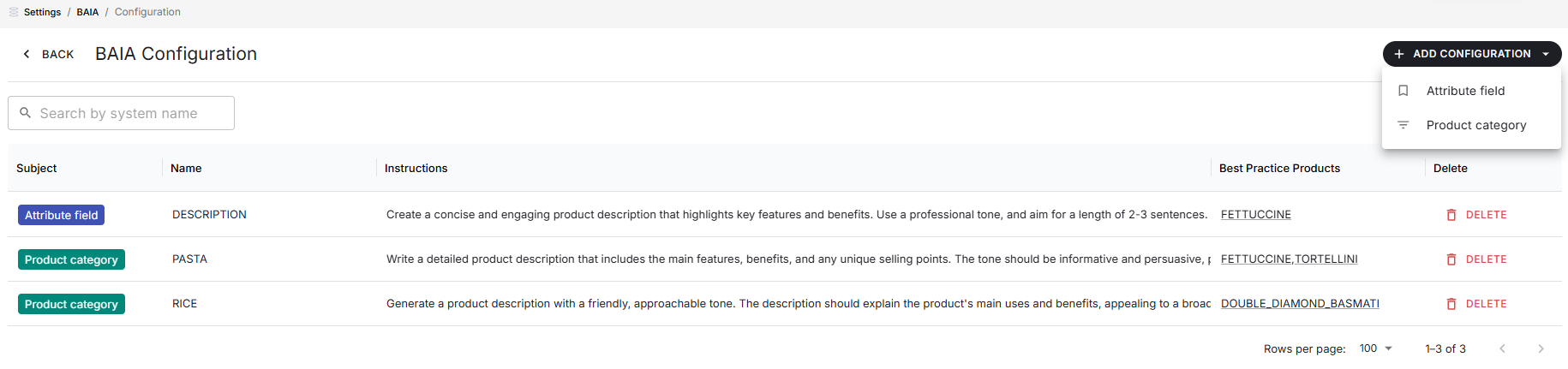
Alternatively, a new attribute field configuration can be initiated from the attribute's details page by clicking the Configure button in the BAIA column. This navigates to the BAIA Configuration page with the field configuration editor opened.
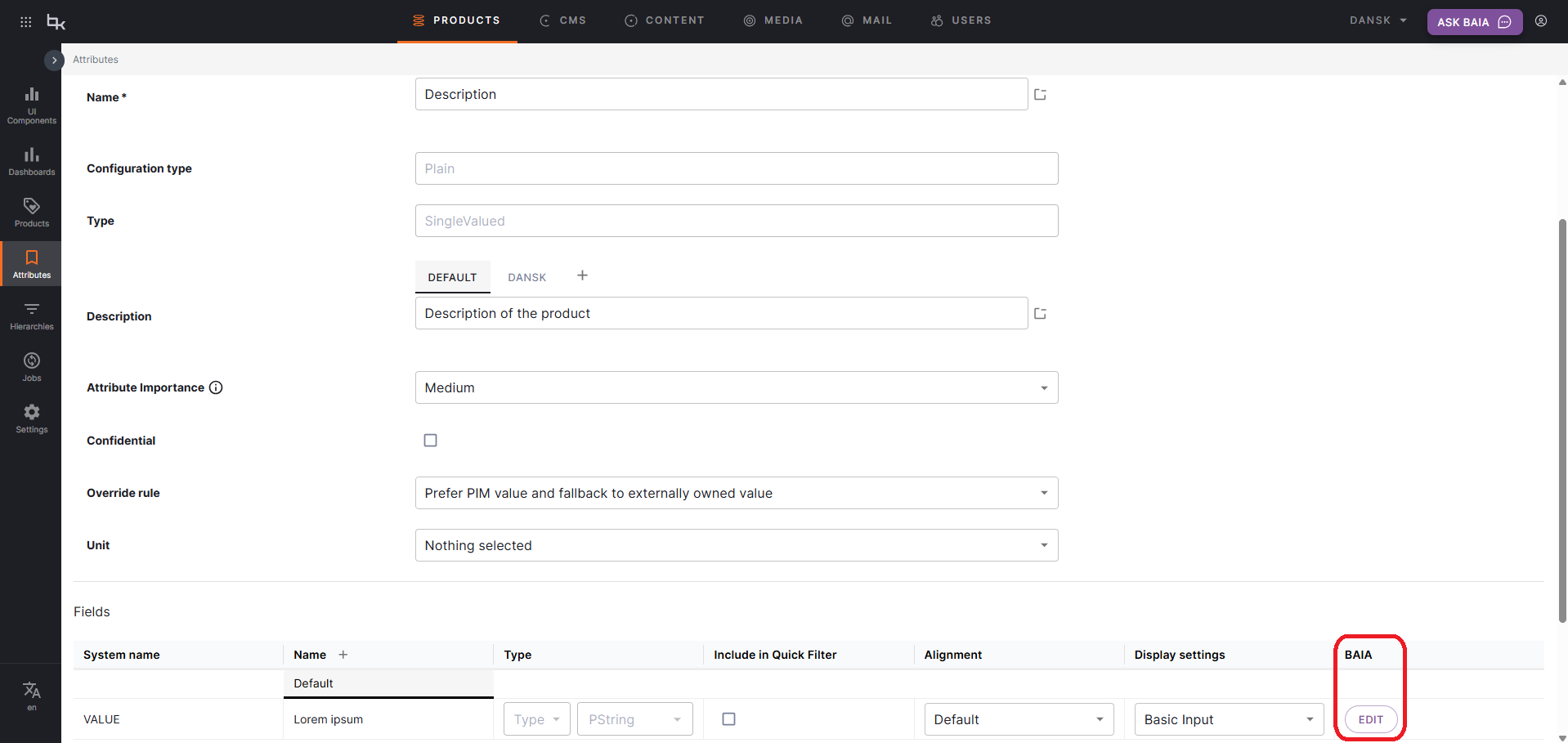
All existing BAIA configurations are listed on the BAIA Configuration page. From here, new configurations can be created or existing can be modified or deleted.
The following input parameters can be configured per configuration:
- Attribute field/product category/translation culture/channel: The attribute field, product category, translation culture, or channel the configuration is for.
- Instruction prompt: Context and guidance for the AI feature.
- Best practice products: Products that set the standard of well-enriched content. Not applicable to translation-culture and channel configurations.
- Use externally owned value: Option to use the externally owned value for the attribute field as input. Only for attribute field configurations.
Note
Translation-culture and channel configurations contain instructions only. Unlike attribute field and product category configurations, they do not take best practice products or the "use externally owned value" option.
Instruction prompt
Providing context to the AI feature in the form of an instruction prompt allows users to customize its result. The instruction prompt can contain any type of instruction, from text length restrictions to instructions regarding tone of voice and target audience.
How to Write a Good Instruction
- Avoid negatives: Instead of telling BAIA what not to do, state what it should do.
- Be precise and consistent: Use clear, direct language and ensure your examples match your instructions.
- Specify the expected output: Clearly define what you want BAIA to generate, including length, tone, and style.
- Leave the output format out: The format of the generated text follows the attribute field's display setting, so a rich-text field already produces an HTML fragment and a basic field already produces unformatted text. See output format.
Overriding the output format
An instruction that states its own formatting takes precedence over the format derived from the display setting. This is intentional, so a field that needs something other than what its display setting implies can still be catered for — but a value that does not match the display setting may need to be reformatted before it can be published, which is what leaving the format out avoids.
Best practice products
The products configured as best practice products act as example products for the AI feature. Best practice products are considered well-enriched products that BAIA uses to understand what characteristics the generated value or suggestion should have. The AI engine learns how to interpret attributes and master data properties from these best practice products.
Use externally owned value for field as input
Note
This setting can only be configured for attribute field configurations
When this option is enabled, the externally owned value for the attribute field will be used as input for text generation if the externally owned value is present. This is useful for generating a text based on an external source, such as a product description from a supplier or manufacturer.
Note
Only the externally owned value for the attribute field will be used as input for text generation, the relevant attributes' values will be resolved based on the Override rule on the attribute.
Product category configuration inheritance
Product categories can inherit BAIA configuration from their ancestor categories. If a category doesn't have its own configuration, BAIA will look up the category hierarchy to find the nearest ancestor with a configuration.
Example
If you have a category hierarchy like Furniture > Chairs > Office Chairs, you can configure BAIA at the Furniture level, and all subcategories will inherit that configuration unless they have their own specific configuration.
Segment-specific configurations
Translation-culture and channel configurations each target a single segmentation dimension, and the two types work in the same way. A configuration targets exactly one segment value, selected when the configuration is created. The target cannot be changed after the configuration is created, but its instructions can be edited at any time. To provide instructions for another segment value, create a separate configuration for it.
A segment-specific configuration only takes effect when generating values for an attribute field that is segmented by the matching dimension. When it does, the configuration matching the active segment on the attribute field is applied, and its instructions are combined with any other instructions that apply.
An attribute field is segmented by at most one dimension, so a translation-culture configuration and a channel configuration never apply to the same attribute field.
Unlike attribute field and product category configurations, these configurations hold instructions only. They have no best practice products and no "use externally owned value" option.
Translation culture configuration
A translation-culture configuration provides instructions that apply when generating values for a specific language or culture, such as en-US or da-DK. Use it to capture guidance that only makes sense for one culture, for example a preferred tone of voice, regional spelling, or market-specific wording.
Note
Translation-culture configurations only take effect for attribute fields that are segmented by translation culture.
Channel configuration
A channel configuration provides instructions that apply when generating values for a specific channel, such as a B2B trade portal or a B2C webshop. Use it to capture guidance that only makes sense for one channel, for example a technical, specification-led style for a trade portal and a shorter, benefit-led style for a consumer storefront.
Note
Channel configurations only take effect for attribute fields that are segmented by channel.
Configuration resolution
When multiple configuration apply, the instructions are combined and the best practice products to use are determined in the following priority:
-
Product category configuration (highest priority)
- If the product has one or more primary categories with BAIA configuration, those best practice products are used
- Multiple primary category configurations combine the best practice products used
- Configuration can be inherited from ancestor categories
-
Attribute field configuration (fallback)
- If no primary category has a BAIA configuration, the best practice products for attribute field configuration is used
- This applies when the product has no primary categories or when primary categories (or ancestors) lack BAIA configuration
Translation-culture and channel configurations do not affect this best practice product priority, because they have no best practice products. When a value is generated for an attribute field that is segmented by translation culture or by channel, the configuration matching the active segment is resolved, and its instructions are combined with any applicable attribute field and product category instructions. Since an attribute field is segmented by at most one dimension, at most one segment-specific configuration is resolved for any given value generation.
Translation-culture instructions per language
Create a configuration for en-US with instructions to use American spelling and a formal tone. To support Danish, create a separate configuration for da-DK with its own instructions. When generating a value for the en-US segment of a description, the en-US instructions are combined with the attribute field and category instructions; generating for the da-DK segment uses the da-DK instructions instead.
Channel instructions per channel
Create a configuration for your B2B channel with instructions to lead with technical specifications and bulk availability. To differentiate the consumer storefront, create a separate configuration for your B2C channel with its own instructions. When generating a value for the B2B segment of a description, the B2B instructions are combined with the attribute field and category instructions; generating for the B2C segment uses the B2C instructions instead.
Best practice products resolution examples
Example 1: Product with configured primary category
- Product: "Office Chair Pro"
- Primary category: "Office Chairs" (has BAIA configuration)
- Attribute field "Description" (has BAIA configuration)
- Result: Best practice products from "Office Chairs" category configuration are used
Example 2: Product with multiple primary categories
- Product: "Gaming Office Chair"
- Primary categories: "Office Chairs" (configured), "Gaming Furniture" (configured)
- Attribute field "Description" (has BAIA configuration)
- Result: Best practice prodctus from both category configurations are used simultaneously
Example 3: Product without category configuration
- Product: "Standard Chair"
- Primary category: "Chairs" (no BAIA configuration)
- Attribute field "Description" (has BAIA configuration)
- Result: Best practice products from the attribute configuration for the "Description" field are used
Example 4: Product with inherited category configuration
- Product: "Executive Office Chair"
- Primary category: "Office Chairs" (no BAIA configuration)
- Parent category: "Chairs" (has BAIA configuration)
- Result: Best practice products from "Chairs" category configuration are inherited and used
Dos and don'ts
When configuring BAIA for product text generation, follow these guidelines to ensure high-quality, reliable results.
Best Practice Products and Inputs
Ensure Best Practice Products Only Contain Information Present in the Inputs
Example: If your input attributes are Name, Material, and Color, your best practice product output should only reference these.
Input: Name: Classic Chair, Material: Oak, Color: Brown
Output: "The Classic Chair is crafted from oak and comes in a brown finish."
Why: Including only information from the inputs prevents BAIA from hallucinating or inventing details.
Don't Include Details in Best Practice Products That Aren't in the Inputs
Example: If your input attributes are Name and Color, but your best practice product output says "Made from oak wood", BAIA may start hallucinating materials.
Input: Name: Classic Chair, Color: Brown
Output: "The Classic Chair comes in a brown finish and is made from oak."
Why: This teaches BAIA to invent information, which can lead to unreliable product texts.
Instructions and Examples Consistency
Keep Instructions and Examples Consistent
Example: If your instruction says "Do not mention the word 'Pineapple'", do not use 'Pineapple' in your examples.
Why: Contradictory instructions and examples confuse the AI and reduce output quality.
Don't Mix Contradictory Instructions and Examples
Example: Instruction: "Never mention 'Pineapple'." Example: "This pineapple chair is..."
Why: Inconsistencies confuse the AI and degrade output quality.
Don't Provide Examples That Contradict Length Instructions
Example: If your instruction says "Write a product description in 40-50 words", your example should not only contain 20 words.
Why: Examples that do not match the specified length confuse the AI and reduce the quality and consistency of the generated output.
Clarity and Precision in Instructions
Be Precise and Consistent in Instructions
Example: "Always use metric units. Write in a formal tone."
Why: Clear, unambiguous instructions help BAIA generate the desired output.
Don't Use Negatives in Instructions
Example: Avoid: "Do not use technical jargon." Prefer: "Use simple, everyday language."
Why: Negatives can be misinterpreted by the AI, leading to unexpected results.
Don't Restate the Output Format in Instructions
Example: Avoid: "Return the description as HTML using <ul> and <li> for the bullet list."
Why: The format already follows the attribute field's display setting. Restating it adds nothing
when it agrees with the field, and silently overrides the field when it does not.