Roles and permissions
PIM validates that users have sufficient permissions to execute operations as well as to view and update entities like product catalogue items, attributes, etc.
Permissions are assigned to roles by administrators. Roles are managed in Bizzkit Iam.
Permissions are managed in PIM under Administration -> Roles.
Types of permissions
Roles in PIM have two distinct types of permissions:
- Application permissions – Control access to functional areas and features of PIM (e.g., managing products, attributes, or catalogues).
- Attribute permissions – Control write access to individual attributes in areas where a role doesn't have Manage or Enrich permission (Only product catalogue currently).
Application permissions
When editing a role, application permissions are grouped in accordions in the Application Permissions tab:
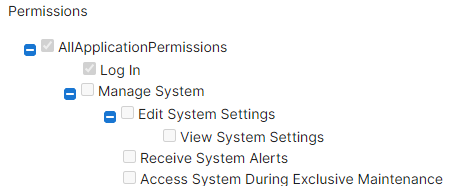
Notice the topmost permission is called All permissions. When assigned to a role, it allows the role to do everything. This is usually only appropriate for administrator roles.
Most permissions are structured as Manage Tenant > Manage X > View X, here illustrated for translation cultures:
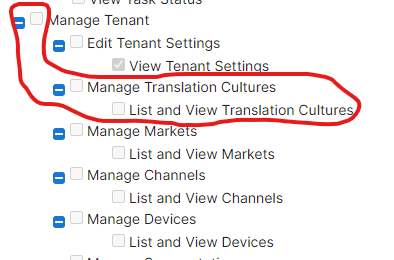
Permissions inherit everything from the right side which implies that:
- if role has List and View Translation Culture permission, only viewing is allowed
- if role has Manage Translation Culture permission, viewing AND editing is allowed
- if role has Manage Tenant permission, viewing AND editing AND managing other entities under the Manage Tenant permission is allowed
- if role has AllApplicationPermissions permission, everything is allowed
The following diagram illustrates the inheritance chain for a typical permission hierarchy:
flowchart LR
    A["All Permissions"] -->|includes| B["Manage Tenant"]
    B -->|includes| C["Manage X"]
    C -->|includes| D["View X"]
Granting a permission on the left automatically includes all permissions to its right. For example, granting Manage X automatically includes View X.
Note
Some areas have additional permission levels. For example, the product catalogue has an intermediate Enrich Product Catalogue permission between Manage and View that grants write access to product attributes.
Attribute permissions
Attribute permissions allow fine-grained control over which roles can write individual attributes in areas where they don't have Manage or Enrich permissions, but has view permission.
For step-by-step instructions on how to configure attribute permissions, see How to configure attribute permissions.
Limit
A role can have a maximum of 100 attribute permissions.
Where attribute permissions are enforced
Attribute permissions are currently only enforced whenever a user edits attributes on products. This includes:
- Standard product editing on the Product Details Page (PDP)
- Mass edit
- Bulk operations
- AI text generation
A user with only the View Product Catalogue permission is unable to edit attributes on products, that they don't have attribute permissions for.
How permission checks work
When a user attempts to modify a product attribute value, PIM evaluates permissions in the following order:
flowchart TD
    A["User attempts to modify\na product attribute value"] --> B{"Does the role have\nManage or Enrich\nProduct Catalogue permission?"}
    B -- Yes --> C["Can modify\nall attributes"]
    B -- No --> D{"Does the role have\nView Product Catalogue\npermission?"}
    D -- No --> E["Cannot modify\nany attributes"]
    D -- Yes --> F{"Does the role have an\nattribute permission\nfor this attribute?"}
    F -- Yes --> G["Can modify\nthis attribute"]
    F -- No --> H["Cannot modify\nthis attribute"]
In short:
- If the role has Manage or Enrich Product Catalogue permission, it can modify all attribute values on products.
- If the role has only View Product Catalogue permission, it can modify only the attributes it has been explicitly granted attribute permissions for.
- If the role has neither Manage/Enrich nor View Product Catalogue permission, it cannot modify any attribute values regardless of attribute permissions.