Calculated attributes
A calculated attribute is a special type of attribute in Bizzkit PIM. Instead of holding a value that a user enters, it has a formula that calculates the value, for example from other attribute values on the same product.
The formula is set on the attribute, and the attribute calculates a result for every product it is assigned to. The result can be shown, filtered on, and exported like the value of any other attribute, but it cannot be edited.
Calculated attributes are a bit like formulas in Excel
Excel also uses the concept of formulas, but it operates on cells instead of attributes, and worksheets or books instead of products (or other entities).
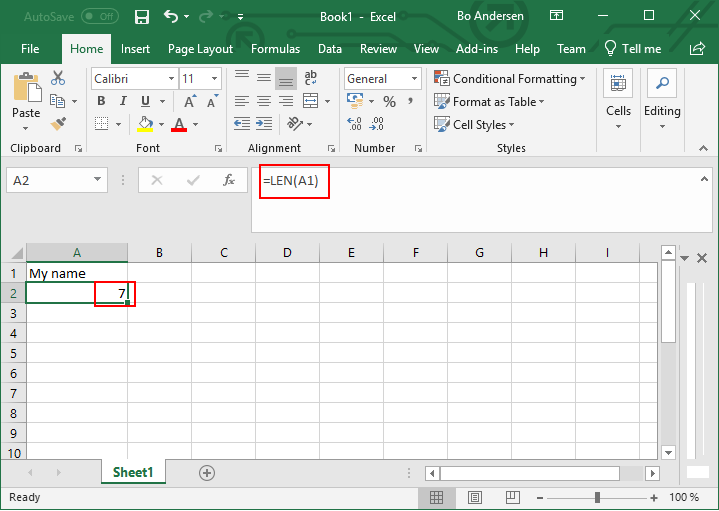
Here we have cell A:1 with the value My name, and another cell A:2 with a formula =LEN(A1) and the result 7, which is the length of the string value in A:1.
Purpose
Calculated attributes allow users to create dynamic attributes. They add flexibility to the PIM attribute system by calculating attribute values instead of storing them.
Because the result can be used in filters, a calculated attribute can also find the products that match a business rule, so they can be followed on a dashboard or changed with a bulk operation.
Examples of using calculated attributes in practice
- Metadata: concatenate various string attributes like NAME, SERIES, etc. into a single field that can be used as meta title, meta description, etc. in an online store
- Price incl. VAT: add VAT on top of PRICE
- Enrichment quality: make a simple enrichment quality assessment based on the length of various fields like for example DESCRIPTION
- Contribution margin: calculate the contribution margin ratio as
(@SALES_PRICE - @COST_PRICE) * 100 / @SALES_PRICE, and build a dashboard of the products with a ratio below 10
Configuration
A calculated attribute is created by choosing the Calculated configuration on a new attribute. The Calculation section of the attribute page then holds two settings, and both are required:
| Setting | Description |
|---|---|
| Formula | The formula that calculates the result. See Writing the formula. |
| Expected Result Type | The type of the result. It decides how the result is shown and which filter operators apply to it. |
The expected result type can be one of the following:
| Expected Result Type | Description |
|---|---|
| Boolean | Either TRUE or FALSE, often used to check conditions based on another attribute's value. |
| Decimal | A numeric result, often used as result of actual calculations, such as price-related data. |
| String | A text output of the formula, for example, when multiple attribute values are combined into a single text. |
The formula can be changed at any time. The expected result type is set when the attribute is created and cannot be changed afterwards, so that saved filters and dashboards on the attribute keep working.
A calculated attribute differs from other attributes in the following ways:
- It is always single-valued.
- It has no fields to configure. PIM manages the fields that hold the formula and the result, and they are not shown on the attribute page.
- Its value is not set on each product or other entity. The formula is defined on the attribute, and the result is calculated for each entity that has the attribute.
Usage
Calculated attributes can be used on all entities with an attribute collection, including products and product categories. The attribute is assigned to a product like any other attribute.
On the product page, a calculated attribute shows its formula under Formula and the calculated value under Result. Both are read-only. A variant inherits a calculated attribute from its master, and the result is calculated from the variant's values, including the values it inherits.
Where the result is available
| Where | How the result is used |
|---|---|
| Product list | The result can be shown as a column. |
| Filters | The result can be filtered on with the operators of its expected result type: text operators for String, numeric operators for Decimal, and the Boolean operators for Boolean. |
| Dashboards | Dashboard widgets are based on filters, so they can use the result in the same way. |
| Mass edit | The result is shown as a read-only column. |
| Product CSV export | The result is exported in a column named after the attribute, for example MARGIN/RESULT. A segmented result gets one column per segmentation, with the same segment suffixes as other segmented values. A product CSV import ignores these columns. |
| Resolved views | The result is included like the value of any other attribute. |
The formula itself is not shown in the product list, in filters, or in dashboards.
When the formula cannot be calculated for a product, for example because a value it reads is missing, the product has no result. It shows as empty, and it matches the Is blank filter operator.
Segmented results
A result can vary by market, channel, device, or language. It does so when the formula reads a field that varies by that dimension, for example a translated name. PIM calculates the result for each of those segmentations.
- The product list shows the result for the segmentation selected on the page.
- Basic filters use the segmentation selected on the page.
- Advanced filters let you choose the segmentation of the result, with one dropdown per dimension the result varies by. The
Defaultoption uses the result that is calculated without a segmentation.
A filter matches the result for exactly the chosen segmentation. It does not fall back to another segmentation or to the default result.
Keeping the result up to date
PIM calculates the result again when the formula changes, and when a value that the formula reads changes on a product.
When a referenced attribute or field gets a new system name, PIM updates the formulas that refer to it. When a referenced attribute is deleted, the reference stays in the formula, and the formula no longer has a result. These updates can take a short while to show.
Writing the formula
A formula is a single expression that produces one value, and it refers to another attribute by prefixing that attribute's system name with @. For example, @PRICE * 1.25 is the price plus 25 percent VAT.
The formula reference describes the full syntax: the values a formula can hold, the forms an attribute reference can take, the operators and functions that are available, and the errors a formula can produce.